A UAV camera advertised with 160× zoom does not necessarily capture 160 times more usable detail. The number may combine optical magnification, switching between cameras, cropping and image processing—each with different implications for image quality.
For an industrial inspection or patrol team, the real question is not, “Which payload has the largest zoom number?” It is, “At our working distance, can the operator find the asset, keep it in frame and capture the detail needed for a decision?”
This guide explains optical, digital and hybrid zoom, then uses the published specifications of the HEQ K40T quad-sensor gimbal camera as a worked example. It also provides a repeatable test method for comparing drone camera zoom systems using original files rather than headline magnification alone.
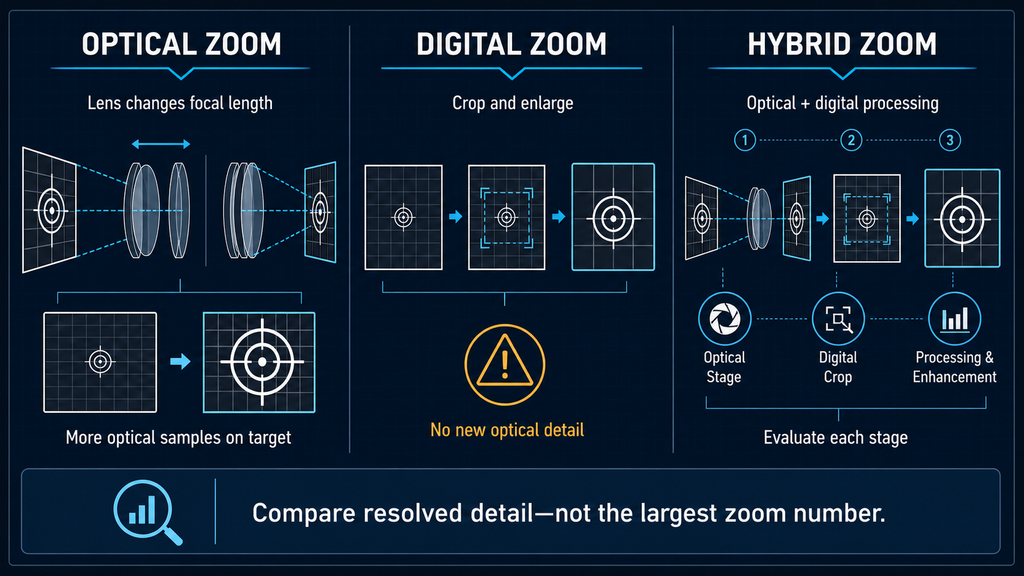
Optical, digital and hybrid zoom comparison for an industrial UAV camera.
Optical, digital and hybrid zoom: the short answer
| Zoom type | What changes | Main advantage | Main limitation | Best evidence |
|---|---|---|---|---|
| Optical zoom | Lens focal length and optical field of view change before the image reaches the sensor | Puts more sensor samples across a distant target | Lens size, aperture, focus, vibration and atmosphere still limit detail | Published focal lengths and native files at multiple zoom positions |
| Digital zoom | A smaller part of the captured image is cropped and enlarged | Provides tighter framing without moving the aircraft | Does not add new optically captured detail; artifacts become more visible as enlargement increases | Same original frame compared before and after crop at 100% view |
| Hybrid zoom | Optical zoom is combined with digital cropping and processing; a multi-camera payload may also switch sensors | Extends the displayed zoom range and simplifies operation | The headline ratio alone does not reveal how much is optical or how well transitions retain detail | Documented zoom stages plus original, fixed-distance sample files |
Sony’s official camera guidance describes optical zoom as changing lens focal length, while digital zoom enlarges the captured image through processing and can reduce image quality. DJI’s developer documentation defines hybrid zoom as a combination of optical and digital zoom. Product implementations differ, but these definitions provide a useful starting point for procurement comparisons.
1. Optical zoom changes what the sensor sees
With optical zoom, moving lens elements change focal length and narrow or widen the field of view before light reaches the sensor. At the telephoto end, a distant object occupies more pixels on the sensor than it would at the wide end, assuming the sensor and output mode remain the same.
Optical zoom ratio = longest focal length ÷ shortest focal length
This equation is straightforward for one continuous zoom lens. A 15.2–50 mm lens has a 50 ÷ 15.2 = 3.29× optical zoom range within that lens.
However, optical zoom is not automatically “lossless” in every operational sense. Focus error, motion blur, haze, heat shimmer, lens performance, sensor noise, video compression and gimbal vibration can still reduce useful detail. Optical zoom improves the geometric opportunity to resolve a target; it does not guarantee that every frame will be readable.
2. Digital zoom enlarges existing samples
Digital zoom selects a smaller region of the captured frame and enlarges it for display or recording. The object appears larger, which can help an operator aim, track or inspect a specific area. But cropping does not create new optical information. Once the target is represented by a limited number of source pixels, further enlargement mainly makes those pixels and processing artifacts larger.
Digital zoom can still be operationally useful. A high-resolution sensor may have enough sampling headroom to crop while still meeting a lower-resolution output requirement. Modern processing can also improve edge appearance and reduce noise. The correct claim, however, is that processing may improve presentation or usability—not that every digitally enlarged pixel represents newly captured physical detail.
This is why a digital zoom sample should be evaluated at the final delivery resolution. A stream shown in a small browser window may look sharp even when the original file cannot support close review. Conversely, a heavily compressed GIF may make a capable camera look worse than the native recording.
3. Hybrid zoom describes a complete imaging chain
Hybrid zoom combines optical magnification with digital enlargement or image processing. In a payload with separate wide-angle and telephoto cameras, the user experience may also include switching between sensors. The interface can present one continuous zoom control even though the image is passing through different optical and processing stages.
The result can be very convenient: the operator begins with wide situational awareness, moves to telephoto detail and continues to a tighter digitally enlarged view. But “160× hybrid zoom” is not interchangeable with “160× optical zoom.” To interpret it, buyers need to know:
- the focal-length range of each optical camera;
- where the system switches between cameras;
- where digital enlargement begins;
- the native sensor and recorded-output resolutions;
- whether processing changes with zoom level;
- how focus, exposure, color and stabilization behave through the transition.
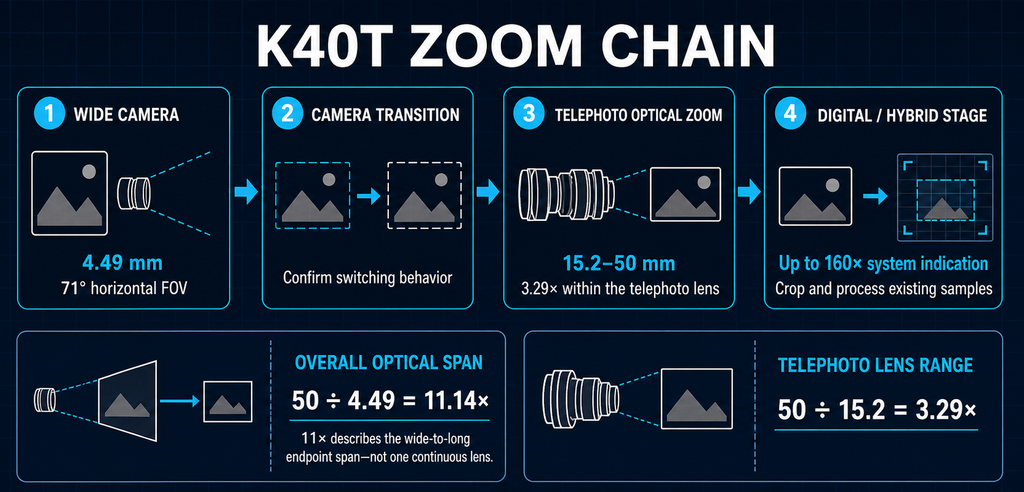
A hybrid zoom number describes the full chain; only some stages change optical focal length.
A K40T worked example: why two optical ratios appear
The current K40T product page lists a 4.49 mm wide-angle camera, a 15.2–50 mm telephoto camera, 11× optical zoom and 160× hybrid zoom. These values need to be read as a system rather than as one lens.
| Calculation | Result | Interpretation |
|---|---|---|
| 50 mm ÷ 15.2 mm | 3.29× | Continuous focal-length change within the published telephoto lens range |
| 50 mm ÷ 4.49 mm | 11.14× | Overall widest-to-longest focal-length span across the separate wide and telephoto cameras |
| Published system value | 11× optical | Closely matches the calculated 11.14× overall span after rounding |
| Published hybrid value | 160× | Maximum system zoom indication; it should not be read as 160× continuous optical zoom |
Based on the published focal lengths, the most technically consistent interpretation is that the 11× specification describes the overall optical span from the wide camera to the longest telephoto position, while the telephoto lens itself provides about 3.3× continuous optical zoom. The exact switching and processing behavior should be confirmed in the current firmware and control application before publication or tender submission.
This distinction is important because a multi-camera transition is not identical to one lens moving continuously from 4.49 to 50 mm. Between the wide camera’s 4.49 mm focal length and the telephoto camera’s 15.2 mm starting point, the interface may rely on cropping, processing or a change of camera view. Buyers should inspect the actual transition rather than infer it from the endpoint ratio.
Field of view makes the zoom ratio easier to visualize
Focal length is useful for comparing the two K40T cameras because both are listed with 1/2-inch sensors. For mission planning, field of view converts the specification into approximate scene coverage at a known distance:
Scene width = 2 × distance × tan(horizontal field of view ÷ 2)
| Slant distance | 71° wide-camera horizontal coverage | 7.4° longest-telephoto horizontal coverage | Approximate coverage ratio |
|---|---|---|---|
| 100 m | 142.7 m | 12.9 m | 11.0:1 |
| 200 m | 285.3 m | 25.9 m | 11.0:1 |
The ratio remains the same as distance changes: the long-end view covers roughly one-eleventh of the scene width shown by the wide camera. Distance changes the number of meters in the frame, not the angular relationship.
These are geometric estimates for a flat scene perpendicular to the viewing direction. They do not predict whether a crack, insulator label, vehicle plate or connector will be readable. That requires the target’s size and contrast, the pixels placed across it, focus, motion, atmosphere and the recorded output to be considered together.
What a 1× to 160× demonstration can prove
A continuous 1× to 160× demonstration is useful for showing the operator experience. It can reveal zoom speed, framing continuity, gimbal stability, camera switching, autofocus recovery and whether the target remains centered. It is good evidence for usability.
It is not sufficient by itself to prove retained image detail at 160×. YouTube recompression, screen recording, resizing and especially GIF conversion can remove or alter fine detail. For image-quality evaluation, keep the video embed for context and offer short original files from selected zoom points.
This sequence demonstrates zoom range and transition behavior. Request the original files for close image-quality evaluation.
How to compare UAV zoom cameras fairly
A fixed-distance test is more informative than comparing two maximum-zoom screenshots captured under different conditions. Use the same target, range, lighting and delivery format for every payload.
- Choose a representative target. Include large high-contrast shapes and progressively smaller details relevant to the application.
- Measure and record the slant distance. Keep the aircraft or fixed mount in the same position for each camera.
- Record the full zoom sequence. Mark the wide view, camera-switch point, telephoto minimum, telephoto maximum and maximum hybrid setting.
- Save native files. Compare original recordings or photographs, not screenshots from different displays.
- Match the final output. Export all samples at the same pixel dimensions and compression settings.
- Compare 100% crops. Judge actual target features, edge separation and text or component readability—not simply how large the subject appears.
- Repeat static and airborne tests. Hover vibration, gimbal control and atmosphere may change the result.
- Document failures. Record focus hunting, exposure jumps, color shifts, transition delays and unstable framing as well as successful frames.
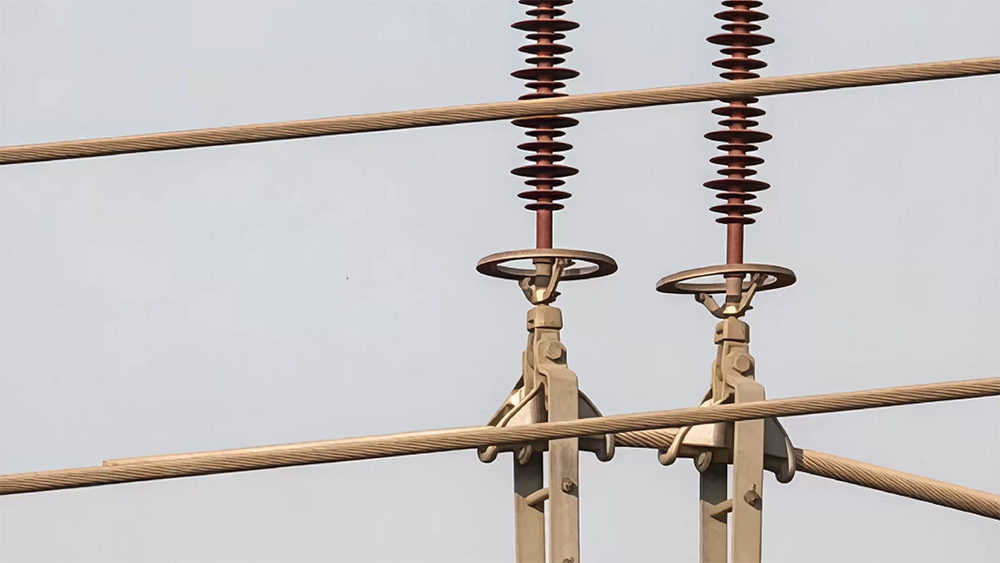
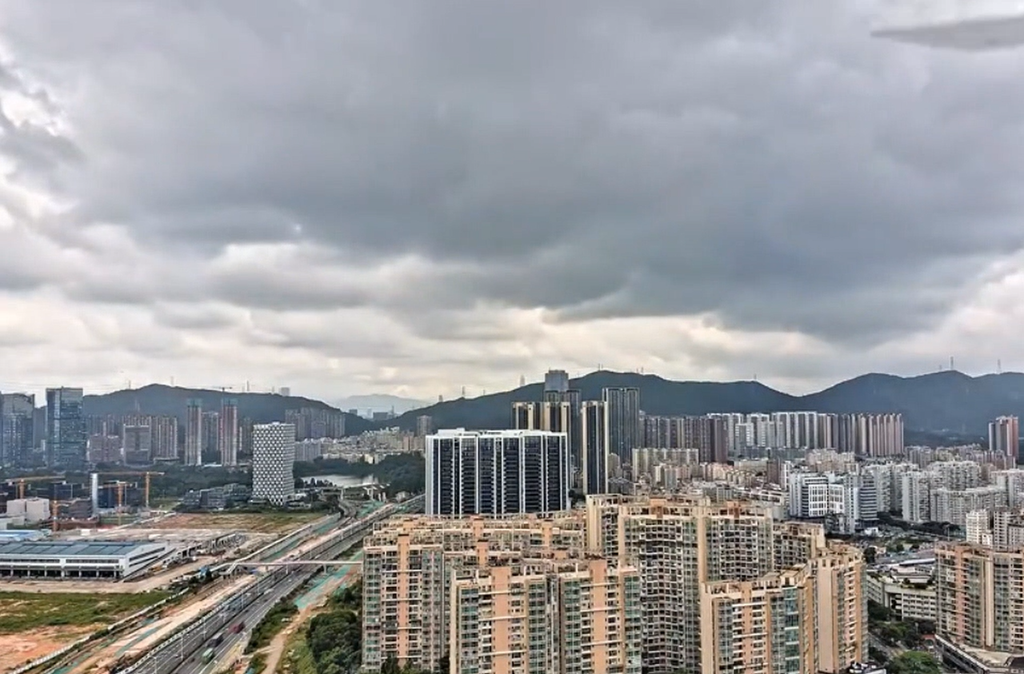
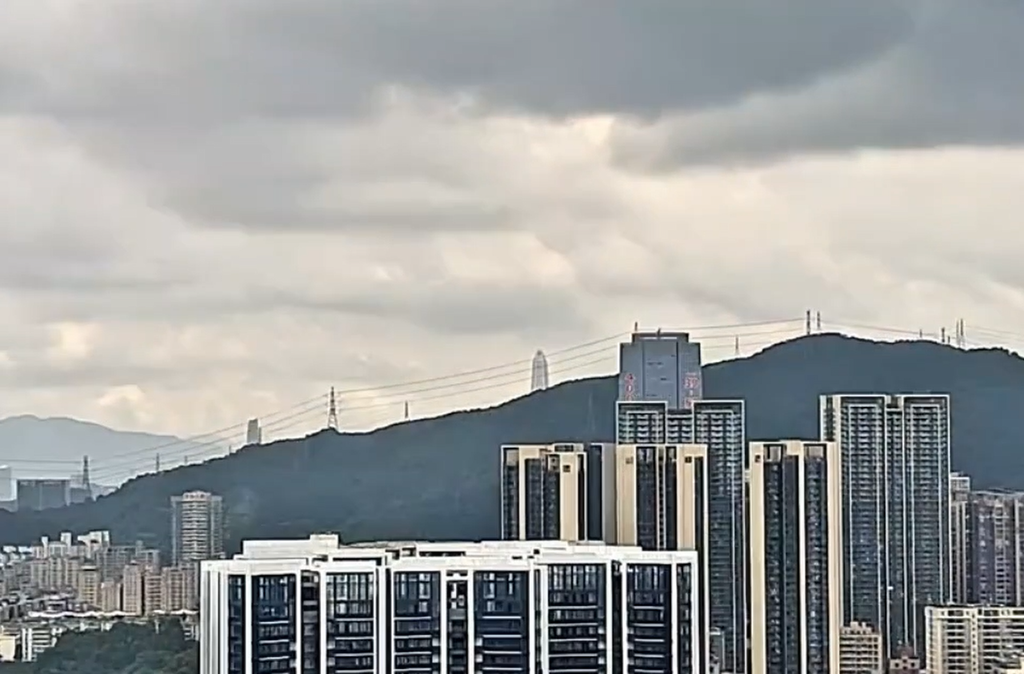
The belowed images are: Wide-angle minimum, wide-angle maximum, telephot minimum, and maximum hybrid zoom.

Which zoom type fits which task?
| Operational need | Zoom capability to prioritize | Why |
|---|---|---|
| Finding an asset or maintaining scene context | Wide field of view and fast camera transition | A narrow view can make the operator lose the target |
| Capturing fine inspection detail from stand-off distance | Long optical focal length, accurate focus and stable gimbal | Optical sampling and motion control determine whether detail reaches the sensor |
| Following a moving person or vehicle during an authorized patrol | Smooth zoom control, reliable tracking and manageable transition latency | Continuity may matter more than the maximum endpoint |
| Tightening the operator’s view after optical zoom is exhausted | Digital or hybrid zoom with clearly stated output resolution | Useful for framing, provided the team understands the detail limit |
| Producing evidence for later technical review | Native recording, metadata and original-file access | A live preview or online video may hide compression and scaling |
A procurement checklist for zoom payloads
- Is the stated ratio optical, digital, hybrid or an overall multi-camera span?
- What are the actual focal-length and field-of-view endpoints?
- How much continuous optical zoom occurs within the telephoto lens?
- Where does the payload switch cameras, and is that transition visible in the recording?
- At what displayed zoom level does digital enlargement begin?
- What are the native sensor, photo, video and live-stream resolutions?
- Are the test samples original files or recompressed web media?
- Do focus, exposure and color remain stable through the usable zoom range?
- How does performance change in hover, haze, low contrast and low light?
- Can the supplier reproduce the test with your target size and working distance?
The practical takeaway
Optical zoom, digital zoom and hybrid zoom solve different parts of the imaging problem. Optical zoom changes the image formed on the sensor. Digital zoom enlarges existing samples. Hybrid zoom connects optical stages with cropping, processing and, in some payloads, multiple cameras.
For the K40T, the published focal lengths support two useful but different figures: approximately 3.3× continuous optical zoom within the 15.2–50 mm telephoto lens, and approximately 11.1× overall optical field-of-view span from the 4.49 mm wide camera to the 50 mm telephoto endpoint. The 160× hybrid value describes a larger system range; it should be evaluated with documented zoom stages and original fixed-distance samples.
If you are selecting a payload for a specific inspection or patrol distance, send HEQ the target type, approximate target dimensions, desired working distance, required output resolution and aircraft interface. We can prepare a relevant zoom sample instead of asking you to choose from one magnification number.
Request Original K40T Zoom Samples
Frequently asked questions
Is 160× hybrid zoom the same as 160× optical zoom?
No. Hybrid zoom combines optical magnification with digital enlargement or processing. Depending on the payload, the complete range may also include switching between separate cameras. Ask the supplier to identify the optical endpoints and the point at which digital enlargement begins.
Does digital zoom add detail?
Digital zoom can improve framing and may use processing to improve appearance, but it does not add new optically sampled target detail. Its usefulness depends on the source resolution, crop level, processing and required final output.
Why can a dual-camera payload have an 11× optical range when its telephoto lens is only about 3.3×?
The two ratios use different endpoints. For the published K40T specifications, 50 ÷ 15.2 gives about 3.3× within the telephoto lens, while 50 ÷ 4.49 gives about 11.1× across the separate wide and telephoto cameras. The transition between those cameras should be evaluated as part of the complete system.
Can I compare two drone cameras using their maximum zoom numbers?
Not reliably. Compare focal lengths, fields of view, sensor and output resolution, optical versus digital stages, focus behavior, stabilization and original files captured at the same target distance.
Is a GIF suitable for evaluating zoom image quality?
A GIF is useful for showing the direction and continuity of a zoom sequence, but its limited color handling, resizing and compression can hide fine detail. Use the YouTube embed for convenient viewing and provide original recordings for technical evaluation.
Calculation note: focal-length ratios are calculated from the specifications published on the K40T product page accessed on August 19, 2026. Scene-width figures use the stated horizontal fields of view and a flat-scene geometric approximation. Product behavior and specifications can change with hardware, firmware and configuration; confirm the supplied version before procurement.
Technical references: Sony: Zoom features and differences; DJI developer documentation: optical, digital and hybrid zoom.